A&P OJT Tracking Software
Grease Pilot is a cloud-based OJT tracking platform built by certificated A&P mechanics for individuals earning their FAA Airframe and Powerplant license through on-the-job training. Log your hours by ACS subject, get digital supervisor sign-offs, and generate FAA-ready PDF reports.
Create a free account to build your apprentice profile and connect with A&P supervisors. See pricing to start tracking hours. A&P supervisors: use Grease Pilot to find and sign off apprentices.
More Than Just Tracking
All the tools to help you get your A&P license — in one place.
Apprentice Profile
Build your profile to connect with A&P supervisors and get discovered on the Apprenticeship Finder
Apprenticeship Finder
Browse A&P supervisors, MX shops, and airports — limited access to preview available opportunities
Public Video Lessons
Access free A&P OJT video lessons to start building your knowledge
OJT Tracking
Log hours by ACS categories with digital supervisor sign-offs
A&P Apprentice Finder
Full access to the Apprenticeship Finder — search MX shops, airports, and A&P mechanics willing to supervise your OJT hours
OJT Checklist
Follow a step-by-step checklist so you never miss a requirement on your path to the A&P
Video Lessons
Full access to all lessons, quizzes, and A&P signed certificates
Support by A&P Mechanics
Get help from real A&P mechanics who understand the OJT process and can answer your questions
See All Basic Features
View everything included in the Basic membership
Everything in Basic
All Basic membership features included
Aircraft Manuals
Access aircraft maintenance manuals to reference while you work and study
How to A&P Course
A structured course walking you through the entire process of getting your A&P license
How OJT Tracking Works
See exactly how students use Grease Pilot to track their hours from start to finish.
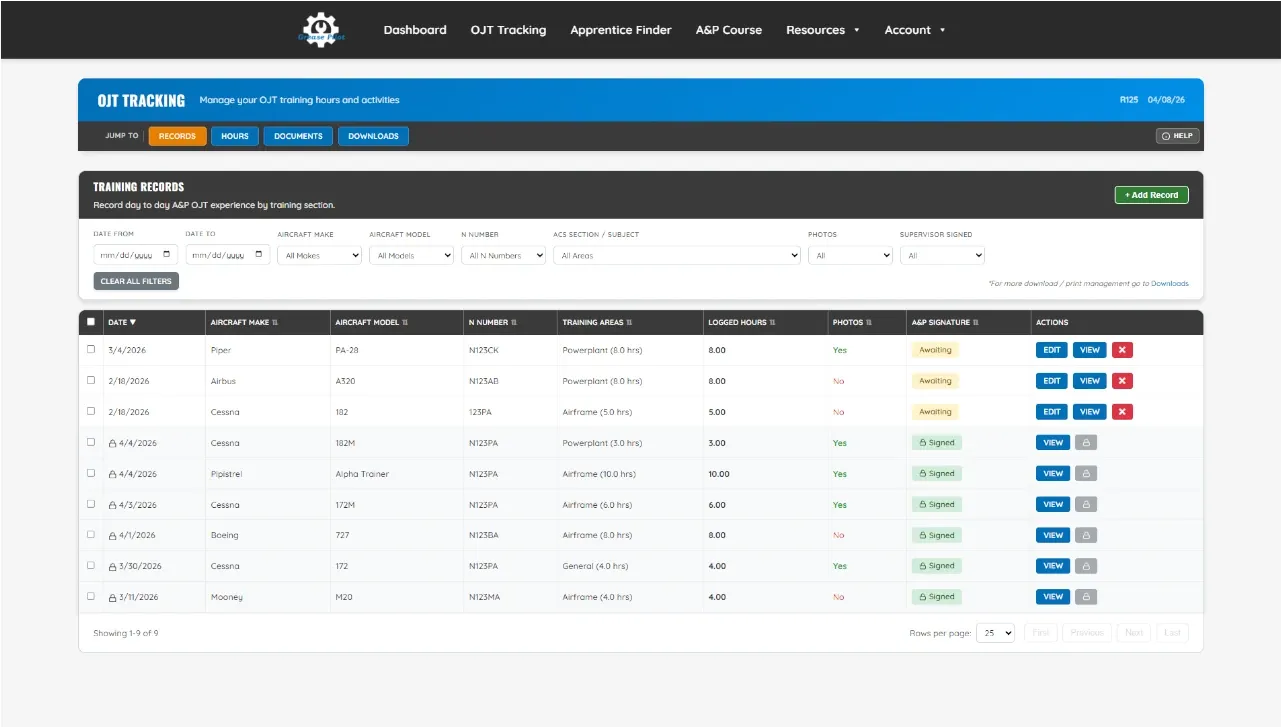
Create a Training Record
Starting at your OJT Tracking dashboard, click "Add New Record" to begin logging a new training entry.
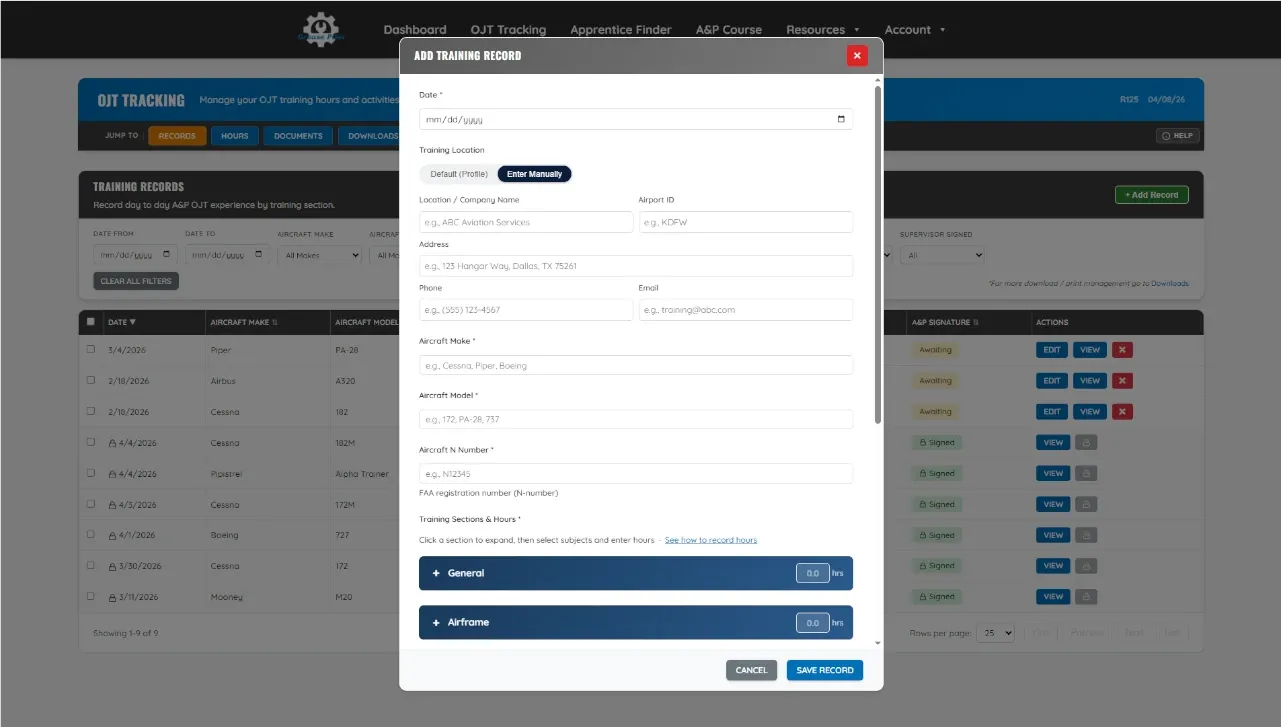
Log Your Hours by ACS Category
Add your experience with location, aircraft details, work performed, pictures, and hours mapped to ACS category.
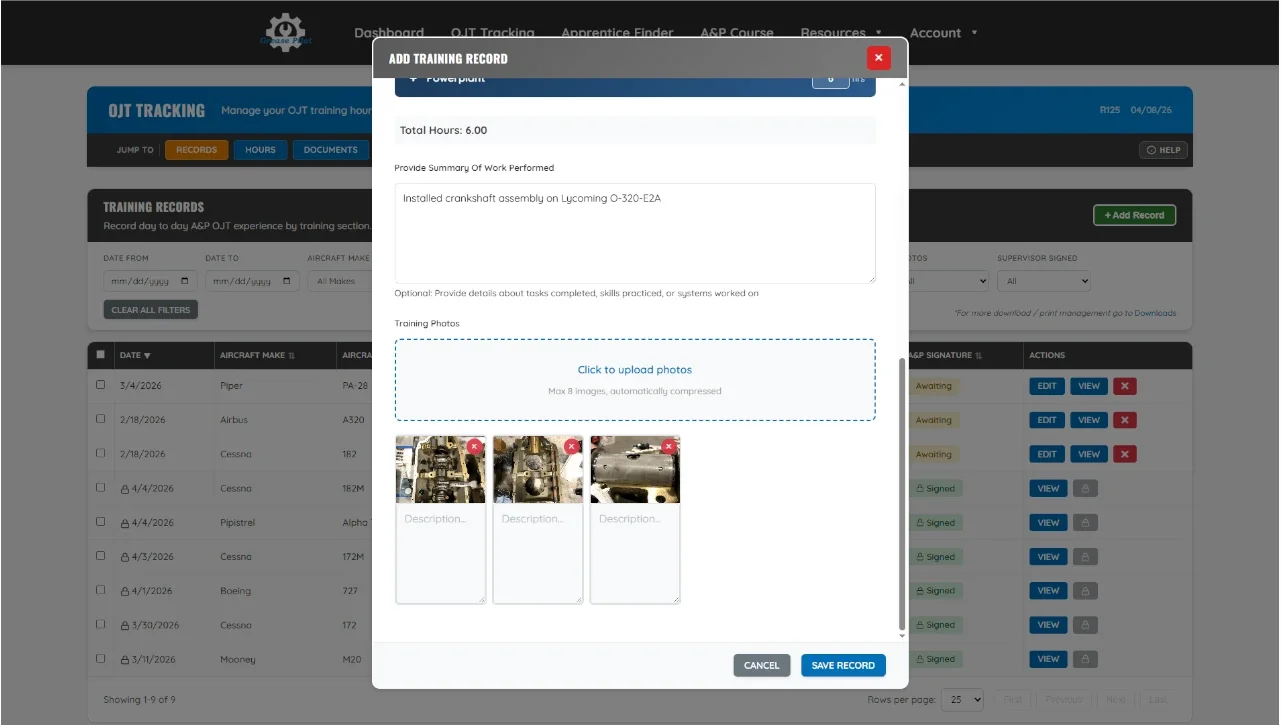
Attach Photos Of Your Work
Photos give the FAA concrete proof of your hands-on experience. Attach images of the work you performed to strengthen your records.
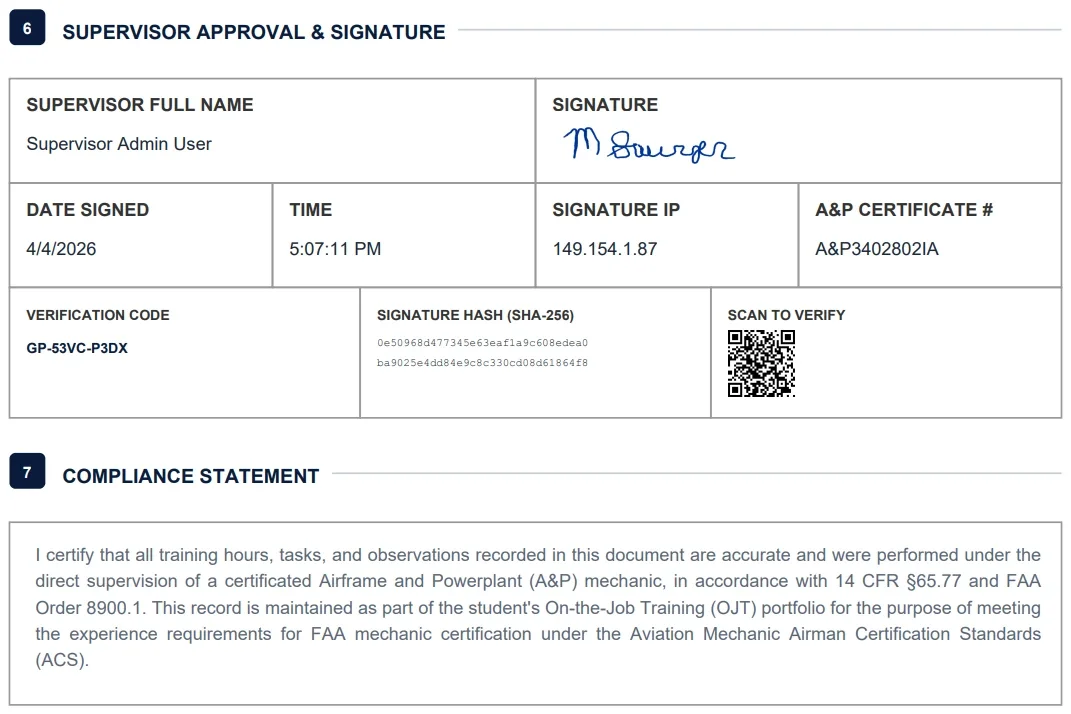
A&P Supervisor Signs Records Digitally
Your A&P supervisor reviews and signs off from any device. Each signature is locked with a cryptographic hash that can't be altered or forged.
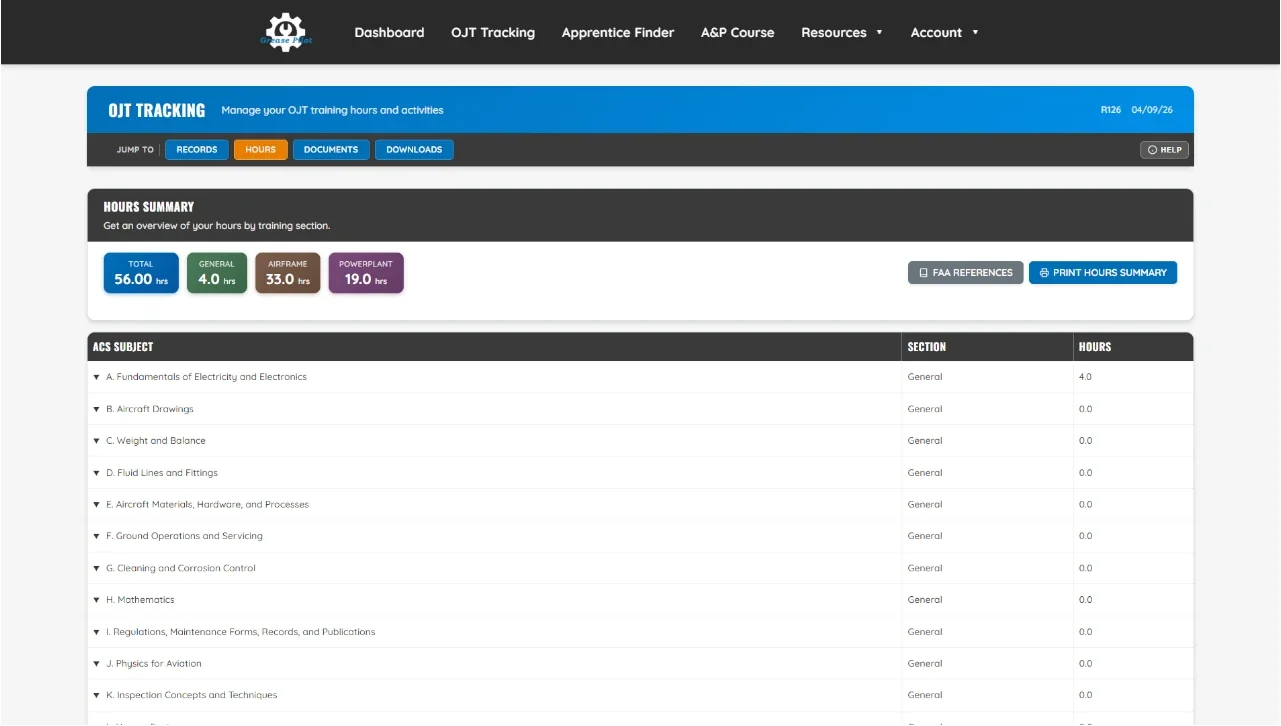
Track Your Progress on the Dashboard
Watch your General, Airframe, and Powerplant hours grow on your live dashboard.
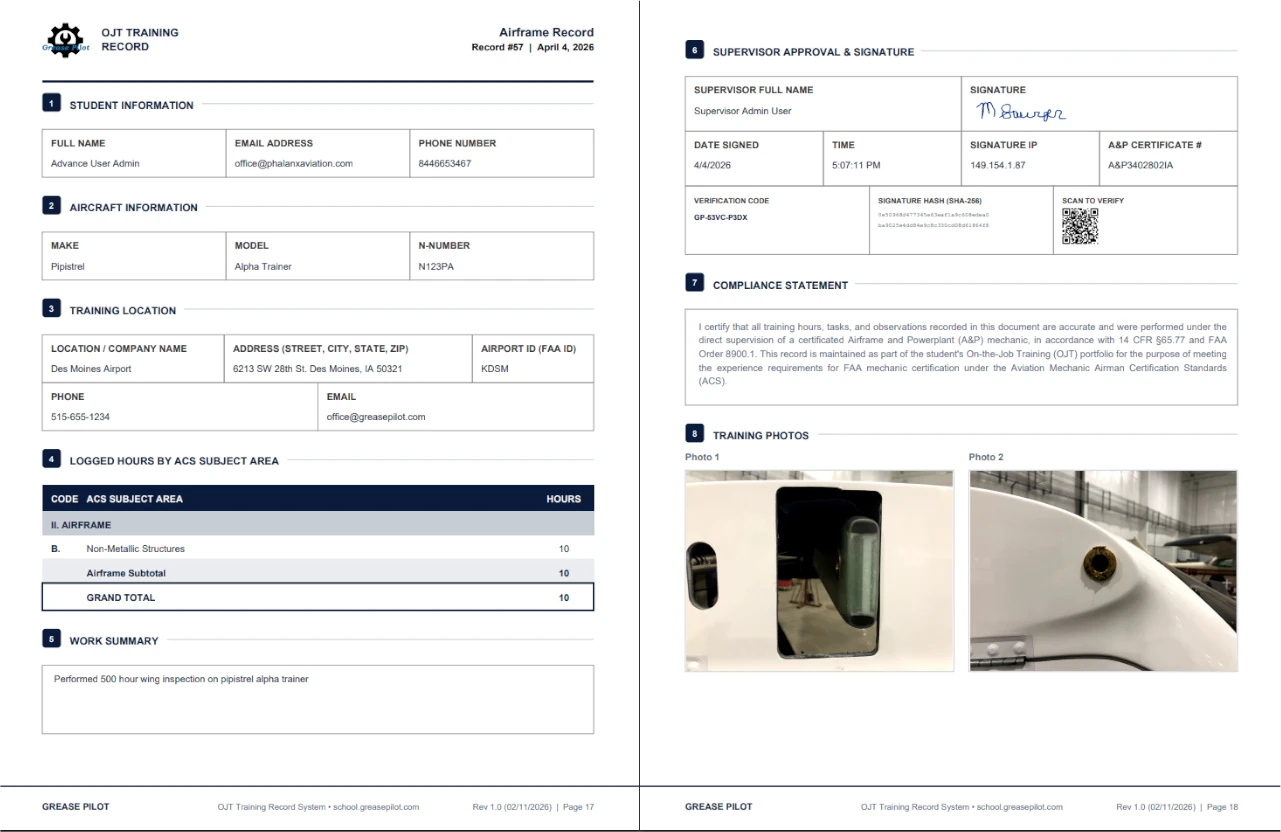
Export FAA FSDO-Ready Reports
Generate a professional PDF package organized for your FAA FSDO appointment — cover page, hours summary, training records, and certificates all in one document.
Log Every Hour — Organized by FAA ACS Subject
FAA Order 8900.1, ¶5-1134D(2) requires verifiable OJT experience in at least 50% of the ACS subjects. Our system tracks every hour by subject so you know exactly where you stand. New to the OJT pathway? Start with our free guide to the FAA A&P experience requirements under 14 CFR 65.77.
Stay Organized, Stay Compliant
- Log Airframe & Powerplant Hours — Track detailed task entries that satisfy FAA requirements for each rating
- Organized by ACS Subject Areas — Hours are categorized by General, Airframe, and Powerplant subjects automatically
- Direct Entry or Detailed Breakdown — Enter hours on the section bar for quick logging, or drill into specific ACS subjects
- Part-Time Friendly — Track against the FAA's 40-hour work week standard, whether you're full-time or part-time
- Photo Documentation — Attach photos to each work event for additional proof of experience
Built for FAA Compliance
Your records are organized exactly how the FSDO expects to see them. No reformatting, no guessing.
Generate export-ready reports with one click.
Digital Supervisor Sign-Offs
No more chasing paper signatures. Your supervisor reviews and signs your records digitally — from any device.
Easy, Secure A&P Signatures
- Invite Your Supervisor — Your A&P supervisor gets their own free account to review and sign your records
- Tamper-Proof Verification — Every signed record is locked with a cryptographic signature hash that can be independently verified
- No More Paper Chase — Supervisors review and sign from their phone, tablet, or computer
- Audit Trail — Every signature includes timestamp, supervisor A&P certificate number, and verification code
- FAA Compliant — Signatures include the supervisor's A&P certificate number, IP address, and a QR code for independent verification
Ready for Your FSDO Appointment
Every signed record is locked and verifiable. When the FSDO reviews your documentation, your records will be professional, organized, and tamper-proof.
The kind of documentation that gets approved on the first visit.
FAA-Ready PDF Package
Generate a professional, organized PDF package ready for your FSDO appointment — all from your dashboard.
Everything the FSDO Needs in One Document
- Cover Page — Professional title page with your name, certificate goal, and training summary
- Table of Contents — Auto-generated with page numbers for easy FSDO navigation
- Hours Summary by ACS Subject — Clear breakdown of General, Airframe, and Powerplant hours
- Training Records with Signatures — Each record includes supervisor sign-off with tamper-proof verification
- Lesson Certificates — No AI lessons here. Watch the lesson, take the quiz, get the certificate. Certificates show up in your FAA PDF package
- Supporting Documents — Test results, 8610-2 forms, and any uploaded documentation
Ready for Your FSDO Appointment
Your entire training portfolio — professionally organized and ready to present. No scrambling, no reformatting.
The kind of documentation that gets approved on the first visit.
Start Free — Upgrade When You're Ready
No credit card required. No contracts. Cancel anytime.
Designed by A&P Mechanics
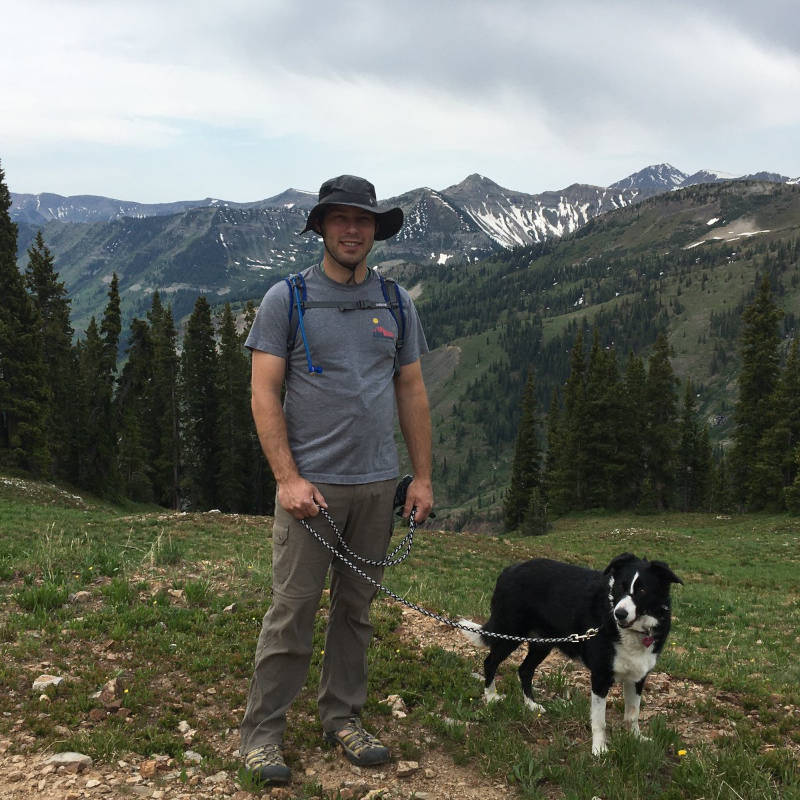
Michael Sawyer
A&P3402802IA • Inspector Authorization
Grease Pilot was created by Michael Sawyer, a certificated Airframe & Powerplant mechanic and Inspector Authorization holder who has been in aviation maintenance since 2009. Today, Michael runs Phalanx Aviation and Grease Pilot — combining real-world maintenance operations with tools that help the next generation of A&P mechanics earn their certificates.
Frequently Asked Questions
Updated April 2026 — based on current FAA regulations and guidance
What is A&P OJT tracking software?
A&P OJT tracking software is a digital tool used by individuals pursuing their FAA Airframe and Powerplant (A&P) mechanic certificate through on-the-job training. It logs practical experience hours by ACS subject area, captures digital supervisor sign-offs, and generates organized PDF reports for FSDO review. Grease Pilot is a cloud-based A&P OJT tracking platform available at school.greasepilot.com. Learn more about the full certification process in our guide to becoming an aircraft mechanic.
What are the risks of poor A&P OJT experience documentation?
Poor documentation is one of the most common reasons mechanics fail to get their A&P certificates approved at the FSDO. If your records are incomplete, disorganized, or lack proper supervisor verification, the FAA inspector may reject your application — even if you have years of hands-on experience. This can delay your approval by months.
What documentation do I need to keep to track my A&P OJT experience?
You need detailed records of each work session including the date, location, aircraft make/model/N-number, a description of the work performed, the number of hours worked, and the ACS subject area the work falls under. Each record should be verified and signed by a certificated A&P mechanic who directly supervised your work. Photos of completed tasks strengthen your documentation.
What Counts as Documentary Evidence
Documentary evidence is any record you provide that shows proof of training and the practical experiences you have completed. The FAA accepts:
- Aviation-related course completion certificates
- Training records
- DD Form 214 (Certificate of Release or Discharge from Active Duty)
- Evidence of additional military qualifications (CDI, QAR, Quality Assurance Department assignment, Engine Turn Qualification Endorsement, etc.)
- AMT log signed by your supervising mechanic
- Employer statement confirming you earned practical experience with procedures, practices, materials, tools, machine tools, and equipment used in constructing, maintaining, or altering airframes/powerplants for the required time
- Letters of recommendation
What format should my A&P OJT experience log be in?
The FAA does not mandate a specific format, but your records must be organized, legible, and verifiable. The FSDO expects to see your hours broken down by General, Airframe, and Powerplant ACS subject areas with supervisor sign-offs. Grease Pilot automatically organizes your records in the format the FSDO expects and generates professional PDF reports ready for your appointment.
Do I need A&P signatures for my A&P OJT experience?
Yes. Under 14 CFR §65.77, your practical experience must be performed under the direct supervision of a certificated Airframe and Powerplant (A&P) mechanic. Each training record should be signed by the supervising A&P, including their certificate number, the date, and verification that the work was performed under their supervision. Grease Pilot provides tamper-proof digital signatures with cryptographic hash verification. Have questions? Contact our A&P support team.
How much experience do I need to show in the different FAA ACS categories for A&P OJT?
Per FAA Order 8900.1, ¶5-1134D(2), applicants with civil experience must have verifiable experience in at least 50% of the ACS subject areas for each rating sought (General, Airframe, and/or Powerplant). You also need a minimum of 18 months of experience for a single rating or 30 months for both ratings concurrently, based on a standard 40-hour work week. Grease Pilot tracks your coverage across all ACS subjects so you can see exactly which areas you've completed and which still need work.
Why use Grease Pilot instead of spreadsheets or paper logbooks?
Spreadsheets are manual, error-prone, and offer no signature verification or ACS subject mapping. Paper logbooks can be lost or damaged, aren't organized for FSDO review, and don't support digital signatures. Generic project trackers aren't built for FAA ACS categories and have no supervisor sign-off workflow. Grease Pilot is purpose-built for A&P OJT — it automatically maps hours to ACS subjects, captures tamper-proof digital supervisor signatures, and generates a complete PDF package organized for your FSDO appointment.
What happens to my training records if I cancel my subscription?
Nothing gets deleted. Your records — including everything your supervisor has signed — stay stored under your account, and you can still sign in to view and download all of them after canceling. Canceling disconnects you from your supervisor and pauses creating new records and digital signing; reactivate anytime and pick up where you left off. We also recommend periodically downloading your records so you always hold your own copy.